Kruti Dev 010 Keyboard Layout & Hindi Typing Chart
The Kruti Dev 010 keyboard is the official Remington Hindi typewriter layout used across Indian government exams like CPCT and SSC. This interactive tool provides a real-time on-screen keyboard, live typing practice with instant Unicode translation, and a free downloadable PDF layout chart.
How It Works
Formula
Remington QWERTY Key (Physical Keypress) → Kruti Dev 010 Glyph → Unicode Devanagari Worked Example
Pressing keys 'H' + 'k' + 'k' + 'j' + 'r' produces 'Hkkjr', which renders visually as 'भारत' in Kruti Dev font and translates instantly to Unicode UTF-8.
Direct Answer (AI Overview): The Kruti Dev 010 keyboard is a Remington-based Hindi typing layout that maps standard QWERTY keys to Devanagari characters. Unlike phonetic typing, typists strike dedicated keys for consonants, vowels, and matras (e.g., ‘d’ for क, ‘k’ for ा). It remains mandatory for government clerk, stenography, and CPCT typing tests across India.
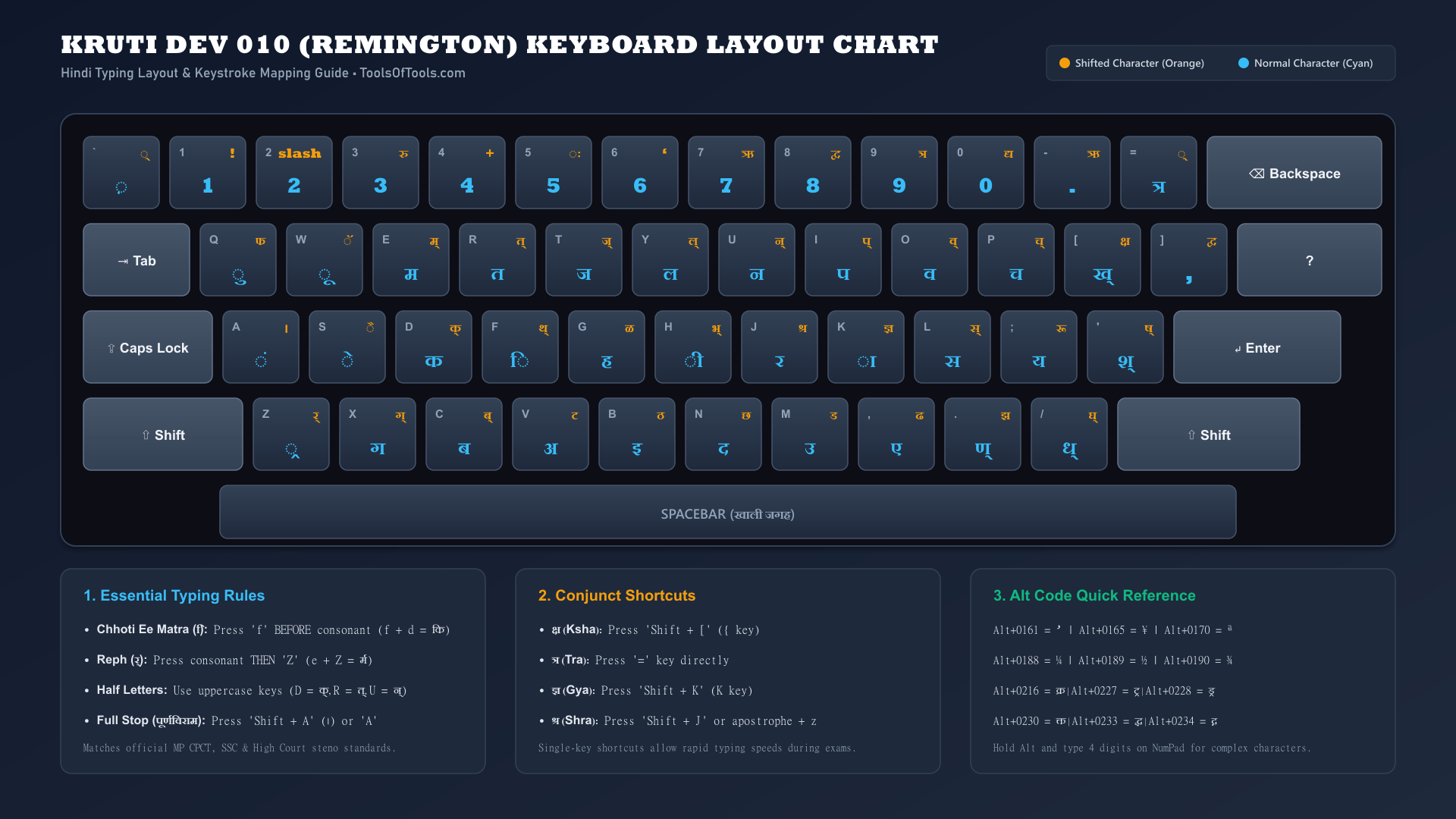
Kruti Dev 010 Keyboard Chart (Printable Reference)
Below is the complete visual reference chart for the Kruti Dev 010 keyboard layout (often searched as krutidev keyboard, kurtidev keyboard, or kruti dev chart). It depicts all four primary typewriter rows, showing both unshifted (cyan) and shifted (orange) Devanagari characters:
How to Type in Kruti Dev 010: Step-by-Step Guide
Learning kruti dev hindi typing requires understanding the mechanical principles of the classical Remington typewriter. Follow these practical steps to master the layout:
Step 1: Establish Proper Home Row Finger Placement
Just like touch typing in English, place your eight fingers on the home row keys:
- Left Hand: Little finger on
A(ं), Ring finger onS(े), Middle finger onD(क), Index finger onF(ि). - Right Hand: Index finger on
J(र), Middle finger onK(ा), Ring finger onL(स), Little finger on;(य). - Thumbs: Rest comfortably on the
Spacebar.
Step 2: Master Pre-Base Vowels (Chhoti Ee ki Matra)
The most common mistake for beginners learning the kruti dev 010 keyboard is typing the matra after the consonant. In Kruti Dev:
- Strike the
fkey first. - Strike the consonant key immediately after.
- Example: To write दिन, type
f+n(producing दि) followed byu(producing न) =fnu.
Step 3: Type Reph (र्) Correctly
Reph (half-ra sitting above a consonant) is typed in the opposite order:
- Type the base consonant first.
- Press
Shift + Z(capitalZ) to place the reph over that consonant. - If an aa matra (ा) follows, press
kafterZ. - Example: To write धर्म, type
/k(ध) +e(म) +Z(reph) =/keZ.
Step 4: Utilize Dedicated Half-Consonant Keys
Instead of typing halant every time, Remington layout provides single-key uppercase shortcuts for high-frequency half letters:
Shift + D=क्(Half Ka)Shift + R=त्(Half Ta)Shift + U=न्(Half Na)Shift + L=स्(Half Sa)Shift + E=म्(Half Ma)Shift + P=च्(Half Cha)
Complete Kruti Dev 010 Key Mapping Table
| English Key | Normal (Unshifted) | Shifted Key | Normal Sound | Shifted Sound |
|---|---|---|---|---|
Q | q (ु) | Q (फ) | Chhota U Matra | Pha |
W | w (ू) | W (ॅ) | Bada U Matra | Chandra E |
E | e (म) | E (म्) | Ma | Half Ma |
R | r (त) | R (त्) | Ta | Half Ta |
T | t (ज) | T (ज्) | Ja | Half Ja |
Y | y (ल) | Y (ल्) | La | Half La |
U | u (न) | U (न्) | Na | Half Na |
I | i (प) | I (प्) | Pa | Half Pa |
O | o (व) | O (व्) | Va | Half Va |
P | p (च) | P (च्) | Cha | Half Cha |
[ | [ (ख्) | { (क्ष) | Half Kha | Ksha Conjunct |
] | ] (,) | } (द्व) | Comma | Dva Conjunct |
A | a (ं) | A (।) | Anusvara (Bindi) | Danda (Full Stop) |
S | s (े) | S (ै) | E Matra | Ai Matra |
D | d (क) | D (क्) | Ka | Half Ka |
F | f (ि) | F (थ्) | Chhoti Ee Matra | Half Tha |
G | g (ह) | G (ळ) | Ha | Retroflex La |
H | h (ी) | H (भ्) | Badi Ee Matra | Half Bha |
J | j (र) | J (श्र) | Ra | Shra Conjunct |
K | k (ा) | K (ज्ञ) | Aa Matra | Gya / Jña Conjunct |
L | l (स) | L (स्) | Sa | Half Sa |
; | ; (य) | : (रू) | Ya | Ruu Ligature |
' | ' (श्) | " (ष्) | Half Sha | Half Retroflex Sha |
Z | z (्र) | Z (र्) | Paden Ra | Reph (Top Ra) |
X | x (ग) | X (ग्) | Ga | Half Ga |
C | c (ब) | C (ब्) | Ba | Half Ba |
V | v (अ) | V (ट) | A Vowel | Retroflex Ta |
B | b (इ) | B (ठ) | I Vowel | Retroflex Tha |
N | n (द) | N (छ) | Da | Chha |
M | m (उ) | M (ड) | U Vowel | Retroflex Da |
, | , (ए) | < (ढ) | E Vowel | Retroflex Dha |
. | . (ण्) | > (झ) | Half Retroflex Na | Jha |
/ | / (ध्) | ? (घ्) | Half Dha | Half Gha |
Important Kruti Dev Alt Code Shortcuts
Certain complex Devanagari conjuncts cannot be typed using simple key combinations. In Kruti Dev 010, hold down the Alt key and type the 4-digit code on your keyboard’s numeric keypad:
| Alt Code | Resulting Glyph | Meaning / Context |
|---|---|---|
Alt + 0161 | ’ | Single Closing Quote / Apostrophe |
Alt + 0165 | ¥ | ञ (Nya) |
Alt + 0170 | ª | ष्ट (Sh-ta conjunct) |
Alt + 0179 | ³ | ङ (Nga) |
Alt + 0188 | ¼ | One Fourth Fraction (¼) |
Alt + 0189 | ½ | One Half Fraction (½) |
Alt + 0190 | ¾ | Three Fourths Fraction (¾) |
Alt + 0216 | क्र | Kra Conjunct (क + ्र) |
Alt + 0221 | द्द | Dda Conjunct (द + ् + द) |
Alt + 0222 | द्य | Dya Conjunct (द + ् + य as in विद्या) |
Alt + 0227 | ट्र | Tra Retroflex (ट + ्र as in ट्रक) |
Alt + 0228 | ड्र | Dra Retroflex (ड + ्र as in ड्राइवर) |
Alt + 0230 | क्त | Kta Conjunct (क + ् + त as in भक्त) |
Alt + 0233 | द्ध | Ddha Conjunct (द + ् + ध as in शुद्ध) |
Why Is My Output Gibberish? — Troubleshooting Guide
- Viewing in Default Fonts: Kruti Dev 010 outputs standard ASCII keystrokes (
Hkkjr). If you paste them into a program without Kruti Dev 010 installed, the computer displays the raw English letters. Once you set the font to Kruti Dev 010, the text displays as Hindi. - Typing on a Laptop Without NumPad for Alt Codes: Alt-code shortcuts (like
Alt+0216for क्र) only register when typed on a dedicated physical numeric keypad (NumPad). If you are using a laptop without a NumPad, enable NumLock or use our live Unicode converter. - Misspelling Confusion: Legacy typists frequently refer to this font as kurtidev, kurti dev, or kurtidev10. All these names refer to the exact same Remington layout mapping detailed on this page.
- Shift Key Stuck in Software: If all typed characters output half-letters (like क् instead of क), verify that Caps Lock or Shift is not locked active.
Frequently Asked Questions
What is the Kruti Dev 010 keyboard layout?
The Kruti Dev 010 keyboard layout is a computer adaptation of the traditional Remington Hindi typewriter layout. Each key on a standard English QWERTY keyboard corresponds to a Devanagari consonant, vowel sign (matra), or conjunct shortcut. For example, pressing 'd' types 'क', 'j' types 'र', and 'k' adds the aa ki matra 'ा'.
How do I practice Kruti Dev Hindi typing online?
You can practice directly using our interactive typing box above. Type on your physical keyboard to practice Remington keystrokes, and the tool will highlight the active virtual key while translating your input into readable Unicode Devanagari in real time. You can also load practice sentences from the preset dropdown.
How do I type half letters on a Kruti Dev keyboard?
Most common half letters (halant forms) have dedicated uppercase keystrokes in Kruti Dev 010. For example, pressing 'Shift + D' (capital 'D') produces half-ka (क्), 'Shift + R' ('R') types half-ta (त्), and 'Shift + U' ('U') types half-na (न्). For consonants without dedicated half-keys, press the virama (्) shortcut using 'Shift + ~'.
Where can I download the Kruti Dev 010 keyboard PDF chart?
You can download the full printable A4 Kruti Dev keyboard chart PDF for free by clicking the 'Download PDF Keyboard Chart' button above. The PDF includes all 4 rows of normal and shift key combinations, Alt code shortcuts, and essential typing rules.
Why is Kruti Dev typing required for government exams like CPCT and SSC?
Many state government departments (such as Madhya Pradesh, Uttar Pradesh, Bihar, and Rajasthan), High Courts, and the Staff Selection Commission (SSC) established typing benchmarks decades ago using Remington typewriters. Kruti Dev 010 preserves this exact physical key layout, making it the mandatory standard for official steno and clerk skill evaluations.
How do I type chhoti ee ki matra (ि) on a Kruti Dev keyboard?
On a Kruti Dev 010 Remington layout, the typist must press the 'f' key BEFORE striking the consonant key. For example, to type 'कि', press 'f' followed by 'd'. To type 'सि', press 'f' followed by 'l'. Our interactive typing practice box handles this sequencing automatically.
Related Tools
← View all font converters toolsKruti Dev to Unicode Converter
Kruti Dev 010 legacy text -> Unicode Devanagari via mapping table + reordering rules (chhoti ee ki matra, reph, half-letters). Live convert, copy, and reverse (Unicode->Kruti Dev) optional. Unit-test with known sample strings. Check licence of any mapping source.
Unicode to Kruti Dev Converter
Reverse of krutidev-to-unicode: Unicode Devanagari -> Kruti Dev 010 via reverse mapping table + reordering (chhoti ee ki matra, reph). Fixed direction; cross-links to /font-converters/krutidev-to-unicode/.
Kruti Dev to Mangal Converter
Kruti Dev 010 -> Mangal (Unicode Devanagari). Mangal is a standard Unicode Devanagari font; conversion is identical to Kruti Dev -> Unicode. Fixed direction; cross-links to /font-converters/mangal-to-krutidev/.
Mangal to Kruti Dev Converter
Mangal (Unicode Devanagari) -> Kruti Dev 010. Reverse of krutidev-to-mangal. Fixed direction; cross-links to /font-converters/krutidev-to-mangal/.
Devlys to Unicode Converter
Devlys 010 legacy Devanagari font -> Unicode Devanagari via mapping table + reph/chhoti-ee reordering. Fixed direction; cross-links to /font-converters/unicode-to-devlys/.
Unicode to Non-Unicode Converter
Generic Unicode Devanagari -> legacy font converter. Default output: Kruti Dev 010. Target font selector: Kruti Dev / Devlys / Chanakya. Differentiates from /font-converters/unicode-to-krutidev/ by covering multiple target fonts.